
 SaaS Metrics
Best Cross-Platform Note-Taking Apps with Seamless Sync 2027
Your Top Recommendations
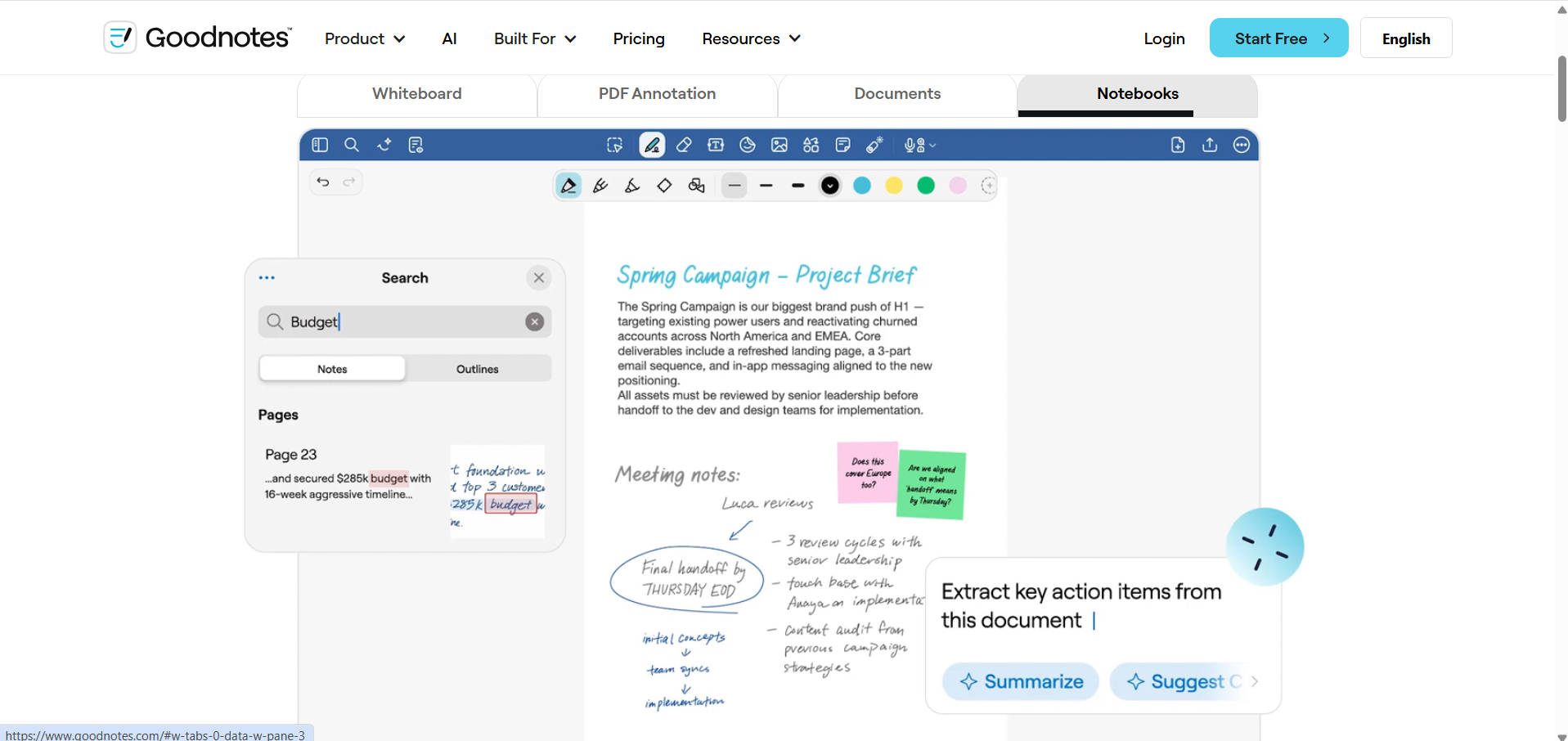
Goodnotes
Match Score: 42
The Digital Notebook Specialist for handwritten notes, PDF annotation, and organized notebooks across supported platforms. Ideal for students and professionals who want flexible handwriting tools and cross-device access.
Goodnotes is our editor's pick in this guide.
Notes are only useful if they are there when you need them. As 2027 approaches, most of us move between a phone, a work laptop, a tablet, and sometimes a second computer in the same day, and an app that only keeps up on one of them quickly becomes a liability. This is why the search for the best cross-platform note-taking apps with seamless sync for iOS, Android, Windows, and macOS in 2027 keeps growing, among students, remote teams, and independent professionals alike.
Plenty of apps advertise "sync everywhere," but far fewer deliver it without gaps, delays, or awkward workarounds. In this guide we compare the main options as of late 2026, looking at how reliably they sync, what they offer beyond syncing, how they feel to use on each system, and what they ask in return, so you can pick one with confidence going into the new year.
If you want the wider context first, see our earlier piece, ultimate cross-platform note-taking apps 2026 analysis. What follows goes further into one question: which apps actually keep every device in step?
Why Reliable Sync Matters More Than Ever Heading into 2027
Hardly anyone lives inside one brand's ecosystem anymore. An iPhone may sit next to a Windows PC, an Android tablet may share a desk with a MacBook, and a work account may differ from a personal one. Your note-taking tool has to cope with all of that. When sync works properly, it gives you several things at once:
- Changes made anywhere show up everywhere within moments.
- You can begin a thought on your phone in a queue and finish it at your desk, with no exporting or emailing yourself.
- Your information lives in one place instead of being scattered across disconnected copies.
- You stop wondering which version is the latest. User complaints about apps such as QuickPlan - Project Gantt Plan, which reportedly leave people with separate, unsynced copies that must be exported by hand, show how quickly trust erodes when sync is missing.
Without dependable sync, even a beautifully designed app turns into a collection of isolated notebooks. The real aim for 2027 is not just recording information but keeping your knowledge usable across every screen you own.
How We Judge Cross-Platform Note-Taking Apps with Seamless Sync for iOS, Android, Windows, and macOS in 2027
To rank the best cross-platform note-taking apps with seamless sync for iOS, Android, Windows, and macOS in 2027, we weigh the following:
The Essentials
- Sync reliability and speed: Changes should travel quietly in the background, cope with offline edits, and resolve clashes sensibly. This counts above everything else.
- Real platform coverage: Genuine support for iOS, Android, Windows, and macOS, preferably through native apps rather than thin web wrappers.
- Media handling: Room for images, audio, PDFs, web clippings, and attachments inside a note.
- Organization: Tags, notebooks, folders, backlinks, and search that finds things quickly.
- Editing options: Markdown, rich text, code blocks, checklists, and drawing or handwriting tools.
- Collaboration: Shared notebooks and live co-editing for teams and study groups.
- Security and privacy: Encryption, passcodes, and plain-language data policies.
- Offline use: Full functionality without a connection, with changes syncing once you are back online.
- Speed: Quick launches and smooth scrolling on every platform, even with a large library.
What Separates the Leaders from the Pack
Beyond the basics, the strongest apps heading into 2027 are adding capabilities like these:
- AI assistance: Automatic tagging, smarter search, summaries, and drafting help. Open multimodal models such as Gemma 4 are already being fine-tuned on laptops with Apple Silicon, which hints that note apps may soon analyze and generate content directly on your device. Limitations around system intents and custom plugins still hold that back today.
- Text recognition from images and handwriting: Pulling searchable text out of photos, scans, and handwritten pages. Tools like Scanner App. JPG, Photo to PDF show how useful this is for turning paper into searchable files.
- Connections to the rest of your stack: Links to calendars, task managers, and cloud storage. FileBrowser Professional is a good illustration on the file side, with cloud integrations and SMB support that let some users do nearly all of their work on an iPad.
The Top Contenders: Best Cross-Platform Note-Taking Apps for 2027
Below are the apps we think deserve a place on your shortlist, judged mainly on how well they travel between devices and how dependably they sync. For a wider look, see our full roundup of the best cross-platform note-taking apps.
Goodnotes: Cross-Platform Handwriting and Note Synchronization
Goodnotes combines digital handwriting, PDF annotation, and notebook organization across supported platforms, including Android, Windows, and web. It is particularly useful for students and professionals who want to keep handwritten notes, meeting records, and annotated documents organized in one place. Users can write with a compatible stylus, search handwritten notes, convert handwriting into typed text, and access their notebooks across supported devices. Goodnotes also offers customizable templates and whiteboards for planning and brainstorming. While its cross-platform availability makes it a flexible option, synchronization capabilities and feature availability can vary by platform and subscription plan. Users who need seamless access to their entire notebook library across different operating systems should check the current plan requirements before choosing Goodnotes.
Evernote: The Long-Standing Archive
Evernote has been around longer than most of its rivals and still earns its place. It runs on iOS, Android, Windows, and macOS, and it handles nearly any kind of input: typed text, web clippings, audio, photos, and PDFs. Everything syncs through Evernote's own cloud, which keeps devices consistent, and its search, including text recognition inside images and PDFs, is still one of its biggest draws. The free plan is tighter than it once was, so heavier users will want a paid tier for extra storage, note history, and offline access. If you want one searchable place to file everything, Evernote remains a dependable choice.
Microsoft OneNote: Best When You Live in Microsoft 365
OneNote gives you a free-form canvas organized into notebooks, sections, and pages, much like a paper binder. It pairs naturally with the rest of Microsoft 365, including Microsoft Outlook, and its OneDrive-based sync is generally fast across Windows, macOS, iOS, and Android. Digital ink, rich media, and shared editing all work well. The same freedom that makes OneNote flexible can also lead to messy notebooks if you do not set some structure early on.
Notion: A Workspace That Goes Beyond Notes
Notion treats notes as one piece of a bigger workspace that also holds tasks, databases, and wikis. Its block-based editor lets you shape pages around almost any workflow, and syncing across iOS, Android, Windows, and macOS is central to how teams use it. Expect a steeper learning curve than with simple note apps. For project tracking, shared knowledge bases, and complex documentation, though, the payoff is considerable.
Obsidian: Your Notes, Stored Locally
Obsidian keeps your notes as plain Markdown files on your own device, which gives you strong ownership and protects against lock-in. For syncing you can use iCloud Drive, Google Drive, Dropbox, or the paid Obsidian Sync service, and with Obsidian Sync set up properly your vault stays consistent across Windows, macOS, iOS, and Android. Its linking system turns scattered notes into a personal knowledge graph, and the plugin library lets you tailor almost everything. It suits researchers, writers, and privacy-minded power users best.
Google Keep: Quick Capture, Anywhere
Keep is built for speed. Its sticky-note layout makes jotting down a thought, list, or reminder almost effortless, and everything syncs through your Google account to Android, iOS, and the web, which covers Windows and macOS through a browser. It is not meant for long documents or detailed organization, but for short, everyday notes that must be available on every device, it does the job without fuss and at no cost.
Simplenote: Plain Text, Done Well
Simplenote strips note-taking down to the essentials: fast text entry, tags, and quick search. It syncs through its own service and runs on iOS, Android, Windows, macOS, and Linux. Markdown is supported, but features are deliberately minimal. If feature-heavy apps feel like too much and you only want a reliable, free place for plain text that follows you everywhere, Simplenote fits.
Joplin: Open Source with Your Choice of Sync
Joplin is an open-source option with rich text and Markdown editing, web clipping, and attachments. Its standout trait is flexible syncing: you can connect Nextcloud, Dropbox, OneDrive, WebDAV, or a local folder, so you decide how much control and privacy you want. Native apps cover Windows, macOS, Linux, iOS, and Android. It is a strong pick for anyone who values open-source software and ownership of their data.
Craft Docs: Polished Documents with an Apple Lean
Craft Docs is known for its refined design and its focus on well-structured, good-looking documents. Like Notion, it uses block-based editing, but it puts more weight on writing and presentation, which suits reports, essays, and knowledge bases. Sync across iPhone, iPad, and Mac is especially smooth. Windows and Android users can reach Craft through its web app, since native support on those platforms is still limited or web-based. It is most appealing if you already work mainly on Apple devices.
Side-by-Side Comparison
This table summarizes how the leading apps compare on syncing and platform support as of late 2026:
| App | Primary Sync Mechanism | Platforms Supported | Key Strengths | Best For |
|---|---|---|---|---|
| Goodnotes | Goodnotes Cloud (plan-dependent) | iOS, Android, Windows, Web | Handwriting, PDF annotation, notebook templates, handwriting search | Students, professionals, and users who want handwritten notes synced across devices |
| Evernote | Evernote Cloud | iOS, Android, Windows, macOS | Web clipping, advanced search, robust capture | Digital filing, archival, general productivity |
| Microsoft OneNote | OneDrive | iOS, Android, Windows, macOS | Free-form canvas, Microsoft 365 integration, digital ink | Students, Microsoft ecosystem users, flexible note-taking |
| Notion | Notion Cloud | iOS, Android, Windows, macOS | All-in-one workspace, databases, project management | Teams, complex knowledge bases, project tracking |
| Obsidian | Obsidian Sync (paid), 3rd-party cloud | iOS, Android, Windows, macOS, Linux | Local files, knowledge graph, extensibility, privacy | Power users, researchers, personal knowledge management |
| Google Keep | Google Account | iOS, Android, Web (Windows, macOS) | Simplicity, speed, reminders, Google integration | Quick notes, lists, reminders, Google ecosystem users |
| Joplin | Various (Nextcloud, Dropbox, OneDrive, etc.) | iOS, Android, Windows, macOS, Linux | Open-source, privacy, Markdown, diverse sync options | Privacy-conscious users, open-source advocates, customizers |
| Craft Docs | Craft Cloud | iOS, macOS, Web (Windows, Android) | Beautiful UI, structured documents, collaboration | Apple users, document creation, aesthetic appeal |
Find Your Perfect Note-Taking App for 2026
Tailor your search based on what matters most to you.
1. Prioritize Your Needs
2. Select Your Preferred Ecosystems
Your Top Recommendations
Adjust the sliders and checkboxes above to see real-time recommendations tailored to your unique needs.
What Makes Sync Truly Seamless
Smooth syncing involves much more than copying files to a server. Several systems have to work together quietly in the background.
Fast Updates and Smart Conflict Handling
Edit a note on your phone, and it should appear on your laptop within moments. That takes efficient transfer methods and solid backend engineering. Just as important is what happens when two devices change the same note while offline. A good app merges the edits or shows you both versions, rather than silently discarding one. Weak conflict handling is one of the most common causes of lost work.
Working Offline, Syncing Later
Seamless sync also means the app is fully usable without a connection. The better tools let you create and edit freely offline, then upload your changes automatically once you are back online, without draining the battery or eating bandwidth. Apps that only save or sync when you manually trigger it tend to frustrate people quickly.
“Without real syncing, you are effectively keeping several notebooks that never talk to each other. Reliable sync is what everything else in a note-taking system rests on.”
Protecting Your Notes in Transit and in Storage
If your notes include private or business-sensitive material, how they are protected while moving between devices matters a great deal. The better services encrypt data in transit and, often, while it sits on their servers. As people grow more aware of how exposed their data can be, strong security has become a real point of difference between apps.
Trends Shaping Note-Taking in 2027
This category keeps changing quickly. These are the developments we expect to matter most in the coming year.
AI That Works Inside Your Notes
AI is shifting from a novelty to a core feature. Text recognition, as seen in Scanner App. JPG, Photo to PDF, is only the starting point. Apps are also summarizing long notes, tagging content automatically, and suggesting related notes or follow-up tasks. As multimodal models such as Gemma 4 become easier to run on personal hardware, we expect more apps to work with text, images, and audio directly on your device, though deeper system integration is still catching up.
Notes That Plug into Your Workflow
Standalone apps are giving way to connected ones. Notes increasingly link to calendars, task managers, project tools, and messaging platforms, so they become part of how work gets done instead of a place where information sits. FileBrowser Professional, with its quick multi-item backups, support for several SMB protocols, and broad cloud connections, reflects what people now expect from tools that need to work together.
Privacy and Control Over Your Data
Concerns about who holds personal data are pushing interest toward local-first storage, as with Obsidian, and toward end-to-end encryption and self-hosting, as with Joplin. More users want to choose where their notes live, and developers are responding with clearer, more user-friendly data policies.
Handwriting and Visual Thinking
Not everyone thinks in straight lines of text. Handwriting, mind maps, whiteboards, and canvas tools are gaining ground because they suit brainstorming and visual learners. If you are weighing dedicated hardware for this, our Best Color E-Ink Tablet 2026: The Ultimate Buyer's Guide and Best Color E-Ink Note Taking Tablets 2026: An Expert Review cover how those devices work with note-taking software.
Choosing the Right App for You
The best choice depends on how you work. These questions can help you narrow it down:
- What will you mostly use it for? A quick scratchpad, a research library, a project hub, a handwritten notebook, or a journal each point to different apps.
- Which ecosystem are you in? Apple, Microsoft, and Google users each have natural fits, while open-source fans may prefer Joplin or Obsidian.
- Do you write by hand? If a stylus is central to how you take notes, an app built around handwriting and PDF markup, such as Goodnotes, will serve you better than a text-first tool.
- What features do you need? Markdown, linking, collaboration, rich media, or AI assistance.
- What is your budget? Decide whether a subscription is fine or you would rather stay with free or one-time options.
- How much time will you invest in learning? Notion and Obsidian reward effort, while Google Keep and Simplenote are usable in minutes.
- How much do you care about privacy? Consider encryption, local storage, and whether you can pick your own sync provider.
Whatever you shortlist, try it for real. Nearly all of these apps have a free plan or trial, so install your top two or three on every device you use and test how quickly edits arrive, how offline changes are handled, and how the app feels on each operating system.
Final Thoughts
Finding the best cross-platform note-taking app with seamless sync for iOS, Android, Windows, and macOS in 2027 comes down to trust: knowing your notes are current, reachable, and safe wherever you open them. Features matter, but the quality of the sync is what separates a tool you rely on from one you work around.
Going into 2027, Evernote, Microsoft OneNote, Notion, and Obsidian stand out for broad platform support and dependable syncing, each suiting a different kind of user, while Goodnotes is a strong fit if handwriting and PDF markup are central to your notes. Craft Docs is also worth watching, especially for Apple users and through its web app elsewhere. Match your own habits to the strengths above, test before you commit, and you will end up with a system that supports your work for years.
